Ajustes de Cuenta (Account Settings)
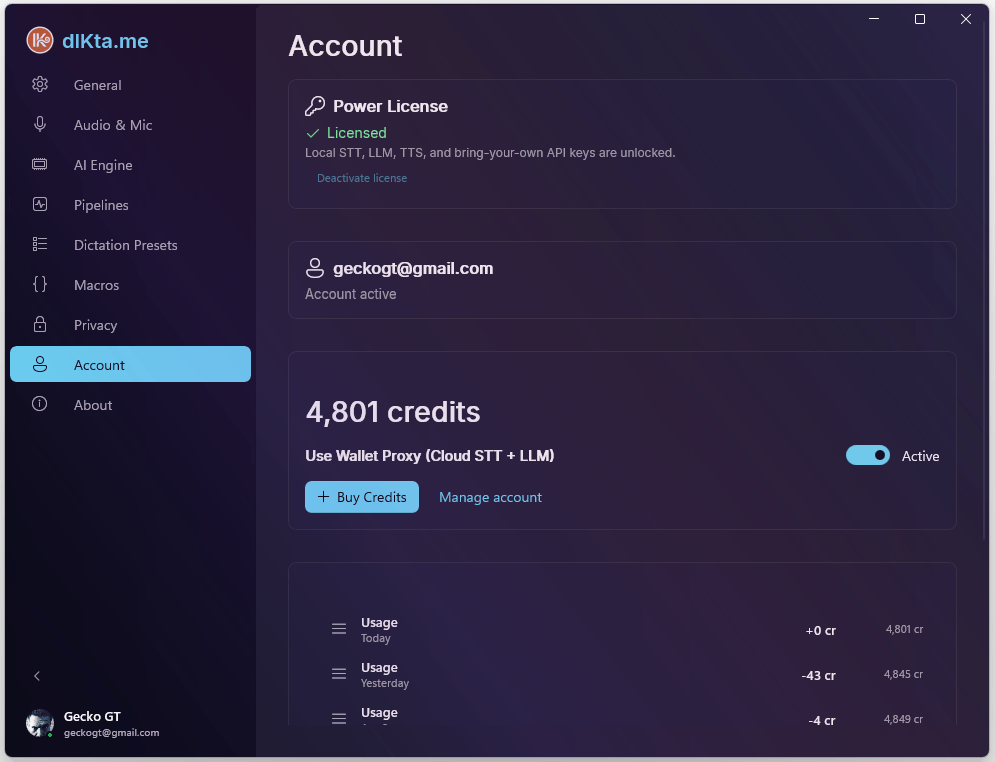
La pestaña Cuenta (Account) gestiona tu Power License, el saldo de la Billetera y el inicio de sesión en la nube.
Para **cambiar** cualquier cosa (comprar créditos, actualizar el avatar, gestionar boletines) usa el [Panel Web](../dashboard.md). Esta pestaña es una vista local, mayormente de solo lectura, de los mismos datos.
Power License (Licencia Power)
La Power License desbloquea dos modos de autenticación adicionales:
- Modo API Key (BYOK) — usa tus propias claves de Deepgram, Gemini, Anthropic, OpenAI, OpenRouter o Requesty
- Modo Local — funciona completamente sin internet con Whisper.net y Ollama en tu propio hardware
Sin una Power License, el Modo Wallet (dictado en la nube usando créditos de dIKta.me) está disponible gratuitamente al iniciar sesión.
Activar tu licencia
- Compra una Power License en dikta.me/pricing. Recibirás una clave de licencia GUID por correo electrónico.
- En la pestaña Cuenta, pega la clave en el campo License Key.
- Haz clic en Activate.
La clave se valida en línea mediante la API de LemonSqueezy y se almacena de forma segura con Windows DPAPI. Una vez activada, dIKta.me funciona sin conexión hasta 30 días sin necesidad de reconexión a internet.
Cada clave admite hasta 3 activaciones por máquina. Para mover tu licencia a otro PC, haz clic en Deactivate primero.
Modos de Autenticación
dIKta.me admite tres modos, que pueden cambiarse desde el Panel de Control:
- Wallet Mode (Modo Billetera) — Cada dictado, traducción y consulta de chat descuenta créditos de tu saldo precargado. No necesitas claves de API, solo iniciar sesión.
- API Key Mode (Modo Clave API) (requiere Power License) — Las solicitudes van directamente desde tu máquina a cada proveedor de IA usando tus propias claves de desarrollador. Los servidores de dIKta.me nunca intervienen.
- Local Mode (Modo Local) (requiere Power License) — Totalmente sin conexión. dIKta.me solo se comunica con Ollama y Whisper.net ejecutándose en tu hardware.
Todos los ajustes de Dictado, Macros y personalizaciones se conservan independientemente del modo o si cierras sesión.
Billetera y Créditos
Inicia sesión con tu cuenta de dIKta.me (mediante OAuth en el navegador) para activar el Modo Wallet.
Saldo
Tu saldo se muestra en créditos (1 crédito = $0,001). El HUD del Panel de Control muestra una versión compacta (p. ej., 4,8k C).
Indicadores de color:
- Verde — 1.000+ créditos
- Amarillo — 500–999 créditos
- Rojo — menos de 500 créditos
Comprar créditos
Haz clic en Buy Credits para abrir el pago del paquete de 4.000 créditos ($5). Si has iniciado sesión, tu correo electrónico se rellena automáticamente. Los créditos aparecen en tu saldo inmediatamente después de la compra.
Historial de uso
La sección Historial de Uso muestra resúmenes diarios de créditos. Cada fila muestra:
| Columna | Descripción |
|---|---|
| Tipo | Uso, Compra, Reembolso, etc. |
| Fecha | Día en que ocurrió la actividad |
| Cantidad | Créditos consumidos o añadidos (p. ej., −12 cr) |
| Saldo | Saldo acumulado después de ese día |
Haz clic en View detailed usage history → para abrir el panel completo en dikta.me/dashboard.
Perfil
- Avatar Customization (Personalización de Avatar): Sube una foto de perfil personalizada. Una herramienta de recorte circular integrada la ajusta perfectamente al HUD y a la ventana de Quick Chat.
- Sign Out (Cerrar Sesión): Borra los tokens de sesión y vuelve al estado no autenticado.